Indian students preparing a US, UK or Canadian student visa application who want the exact document list for their destination, not a mixed one.
How it works
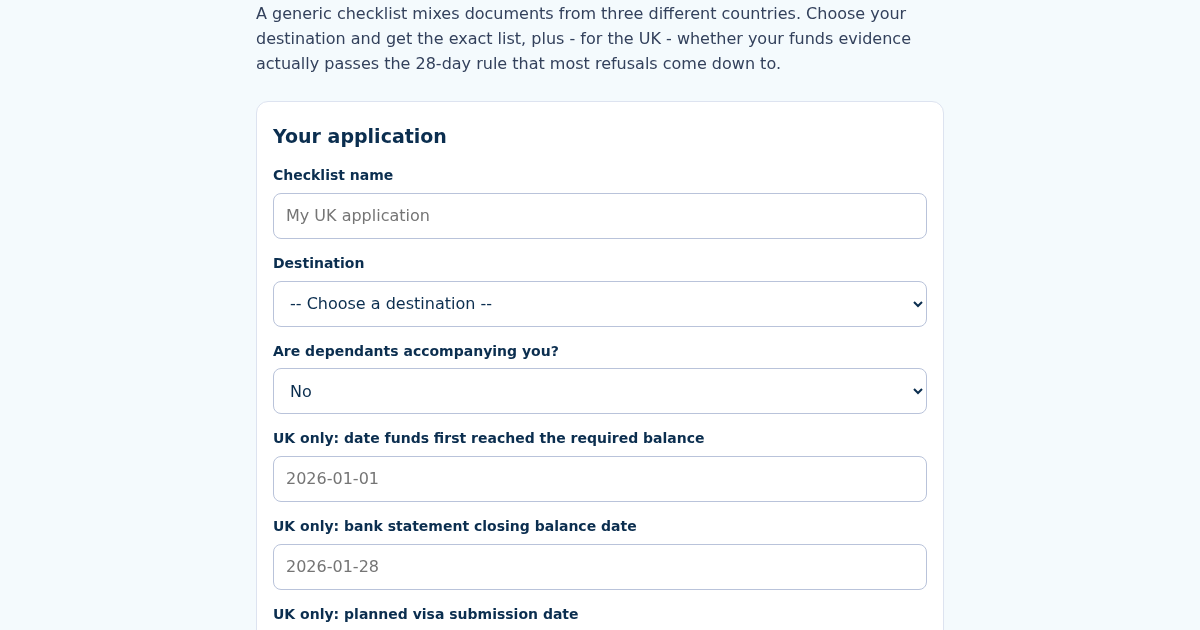
- Name this checklist, e.g. "My UK application".
- Choose your destination country and whether dependents are accompanying you.
- For the UK, enter the date your funds first reached the required balance, your statement's closing date, and your planned submission date.
- Get your tailored document list with reasons, and (for the UK) whether your funds evidence passes the 28-day rule.
What you gain
- Tailored document checklist for the US (F-1), UK (Student visa) or Canada (Study Permit) - not one generic list for all three
- UK's 28-day funds rule calculator: your bank statement's closing balance date must show the money held for a full 28 consecutive days AND be no more than 31 days before you submit - most refusals on funds are exactly this date arithmetic, not the amount
- Every document states why it applies to your destination and circumstances
- Checklists saved by name: recalculating updates the same checklist, not a duplicate
Screenshot
Technical details
How to set up & use
- Buy the license — your key (lic_...) appears on the order page and in your email.
- Sign in at app.synoriaai.com with your license key.
- No installation — the product runs in your browser, on your own isolated instance.
- Open the checklist generator and give your checklist a name.
- Choose your destination: US (F-1), UK (Student visa) or Canada (Study Permit), and say whether you have dependents.
- For the UK, enter your funds start date, bank statement date and planned submission date.
- Run the calculator to see how many days the funds were held and whether the 28-day rule passes.
- Review the tailored document list, where each item explains why it applies to you, and save it under your name.
Frequently asked questions
Does this tool submit my visa application or handle my documents?
No. It only generates a document checklist and, for the UK, checks the 28-day funds date arithmetic. You still gather and submit your own documents to the relevant authority.
Is my information safe?
The checklist is saved under the name you give it so you can recalculate it later. Avoid entering sensitive details such as full account numbers, and check the product's privacy information for how saved data is stored.
Can I use one checklist for all three countries?
No. The checklist is tailored to the destination you select, because the US, UK and Canada have different document requirements.
Related products
SertifikatKu: Auto-Generate Course Completion Certificates
Membuat sertifikat satu per satu secara manual itu lambat, dan sertifikat tanpa cara verifikasi mudah dipalsukan. Masukkan nama peserta, nama kursus, tanggal, dan instruktur, dan ini membuat teks sertifikat lengkap plus…
SertifikatKu: Auto-Generate Course Completion Certificates
Membuat sertifikat satu per satu secara manual itu lambat, dan sertifikat tanpa cara verifikasi mudah dipalsukan. Masukkan nama peserta, nama kursus, tanggal, dan instruktur, dan ini membuat teks sertifikat lengkap plus…
PNCheck: Canadian Express Entry Document Checklist Generator
A generic Express Entry checklist lists everything anyone could ever need, which hides the handful of documents that actually apply to you. Enter your program stream and circumstances - foreign education, job offer,…
PNCheck: Canadian Express Entry Document Checklist Generator
A generic Express Entry checklist lists everything anyone could ever need, which hides the handful of documents that actually apply to you. Enter your program stream and circumstances - foreign education, job offer,…